Understanding the Horn Tweeter and Its Role in High-Fidelity Audio
A Horn Tweeter is a crucial component in audio systems, designed to handle high-frequency sounds with exceptional clarity and efficiency. This guide will walk you through selecting, installing, and optimizing a Horn Tweeter like the innovative DE400 from PRV Audio, ensuring you achieve professional-grade sound in your setups. Whether you're building a home theater or a stage rig, mastering the Horn Tweeter can transform your listening experience.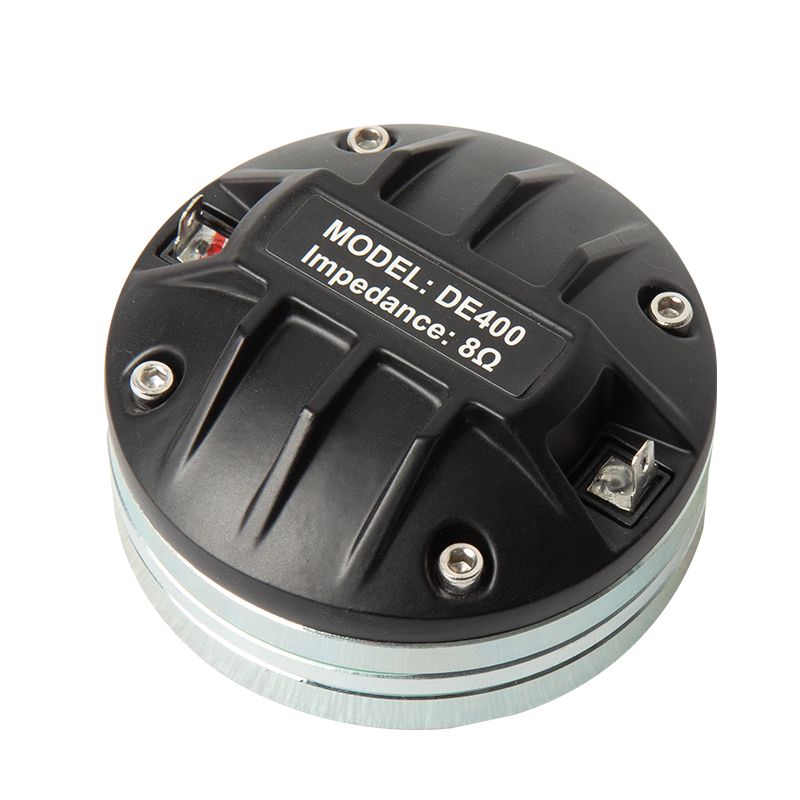
Choosing the Right Compression Driver Tweeter for Your Needs
Start by evaluating your audio requirements when selecting a Compression Driver Tweeter. The DE400 stands out with its 8Ω impedance, making it compatible with a wide range of amplifiers for stable performance. Look for features like a lightweight diaphragm that minimizes distortion and delivers sharp highs. For professional applications, prioritize durability— the DE400's robust black finish and compact design withstand rigorous use, ideal for live events or studios. Compare options by checking frequency response; a good Compression Driver Tweeter should cover 1kHz to 20kHz seamlessly. Budget-wise, invest in quality to avoid frequent replacements, as premium models like this offer longevity and reduce maintenance costs.
Installing a Pro Audio Tweeter Speaker Step by Step
Installation begins with gathering tools: a screwdriver, wire strippers, and soldering iron if needed. First, mount the Pro Audio Tweeter Speaker securely in your enclosure, ensuring alignment with the horn for optimal dispersion. Connect the DE400's terminals to your crossover network, matching positive and negative wires to prevent phase issues. Test impedance with a multimeter to confirm 8Ω stability. For a Pro Audio Tweeter Speaker in stage systems, position it above the woofer to mimic natural sound staging. Seal all joints to eliminate vibrations, and calibrate volume levels gradually to avoid overpowering lows. This methodical approach ensures your Horn Tweeter integrates smoothly, enhancing overall system balance.
Optimizing the High-Frequency Speaker for Stage Performance
Once installed, fine-tune your High-Frequency Speaker for Stage to maximize output. Use an equalizer to boost the highs around 5kHz-10kHz, where the DE400 excels in clarity without harshness. In live settings, pair it with a suitable horn lens to control directivity and prevent feedback. Monitor for overheating during extended use; the DE400's efficient design handles high power well, but ensure proper ventilation. For studio tweaks, A/B test with reference tracks to adjust crossover points, typically at 2kHz for seamless blending. Regularly clean the diaphragm to maintain pristine tones, as dust can dull highs. This optimization turns a standard High-Frequency Speaker for Stage into a powerhouse for dynamic performances.
Integrating a Studio High-Frequency Driver for Professional Results
In recording environments, the Studio High-Frequency Driver like the DE400 shines by providing accurate reproduction for mixing and mastering. Position it in a nearfield monitor setup, angled toward your listening sweet spot for precise imaging. Employ DSP software to apply any necessary EQ curves, focusing on the driver's natural response curve. Test with sine waves to verify flat frequency delivery, adjusting damping if resonances appear. For multi-driver arrays, synchronize timings to avoid comb filtering. The DE400's corrosion-resistant materials ensure reliability in humid studios. By following these steps, your Studio High-Frequency Driver will contribute to mixes that translate beautifully across systems, elevating your production quality.
Maintenance Tips for Long-Lasting Horn Tweeter Performance
To sustain peak performance, perform routine checks on your Horn Tweeter every few months. Inspect connections for corrosion and tighten mounts as needed. Avoid exposing it to extreme temperatures, leveraging the DE400's resilient build for peace of mind. If distortion occurs, replace the diaphragm promptly—PRV Audio offers compatible parts for easy swaps. Store spares in a dry place, and document usage hours to predict lifespan. These habits not only extend the life of your Compression Driver Tweeter but also maintain the crisp highs essential for immersive audio. With proper care, your setup will deliver consistent excellence for years.